AI can build it. Building a good product is harder
- AI
- product design


While some people are still debating whether AI will replace designers and developers, others are already using it as a working tool. Not as a magic button, but to research faster, test hypotheses, build prototypes and remove routine work.
The problem is that AI is surrounded by both hype and fear. Some promise to build products without a team. Others believe neural networks only produce hacky solutions and break everything they touch. Reality sits somewhere in the middle.
We use AI throughout product development, from research to development. But it's not autopilot for us. It's a team amplifier — a second brain that helps us think faster, explore more options and get to the result sooner. The key role still belongs to people.
AI isn't a product specialist
Right now, it's easy to create the illusion that AI can do everything. It writes copy, generates illustrations, suggests code, analyses data and assembles prototypes in minutes. But there's a crucial nuance: AI doesn't understand which solution is genuinely good.
It doesn't know the business context. It doesn't feel the product. It doesn't take responsibility for decisions. And it can't tell a strong idea from one that simply looks plausible.
Without human oversight, AI can quickly produce:
- interfaces disconnected from the context;
- weak product solutions;
- logical flaws;
- insecure code;
- made-up facts and conclusions;
- unstable scenarios.
Much of this can look convincing. That's the main risk.
That's why we don't build our processes around "let AI do everything itself". We see it as a tool controlled by the team.

If specialists are conductors, AI is the orchestra. It can produce a lot of sounds on its own, but the human turns them into a working system — a melody.
Where AI really helps
The most valuable thing about AI isn't generation itself, but the speed at which it can process information and explore different options.
This is especially useful when teams used to spend a lot of time on routine work or testing hypotheses.
Research and getting up to speed
At the start of a project, AI helps us gather and structure information faster:
- analyse competitors;
- collect references;
- prepare reports;
- identify patterns;
- speed up research.
This doesn't replace product research, interviews or analytics. It helps the team get into the context faster and spend less time on routine work.
For example, when a client came to us with a system for selling truck spare parts, we needed to understand how the funnel worked, where users were dropping off and which metrics affected the business. We connected AI to the analytics systems and gathered the data faster.
A "10% conversion rate" means little on its own. What's important is understanding what it changed from and why. AI helped us find patterns quickly, but the conclusions and decisions remained with the team.
Generating hypotheses and solutions
AI is useful for exploring the solution space and generating more options. It can:
- suggest different approaches to interfaces;
- generate hypotheses;
- collect references;
- help find non-standard scenarios;
- quickly test ideas.
This is especially useful early on, when it's important to explore the solution space rather than fall in love with the first option.
In one project, we uploaded research findings, the brief and meeting notes into AI and asked for several interface concepts. We got a set of directions rather than a finished design. Some were useless, but others helped us see the problem differently and find a stronger solution faster.
The final choice still belonged to the team. Because there's an enormous difference between "this can be built" and "this is genuinely a good solution".
Prototyping
One of the most useful applications of AI is rapid prototyping.
AI now lets us build interactive scenarios much faster, which significantly changes the speed of validating ideas.
Instead of discussing static mock-ups, we can:
- quickly test hypotheses;
- show users a working prototype;
- get feedback earlier;
- find problems faster.
For a product team, this is a major advantage because meaningful feedback appears much earlier.
That's how it worked on the Freedom Football Manager project. The client asked us to build a player evaluation service and initially saw it as a standard table with footballer parameters. We uploaded call recordings, analyst reports and the brief into AI and received several interface ideas.
One of them — player cards showing strengths and weaknesses — turned out to be interesting. It wasn't the final solution, but it helped the team find a strong concept faster.

AI in UX and analytics
Another strength of AI is working with large volumes of data.
It helps us:
- analyse reports from Google Analytics and other systems faster;
- identify behavioural patterns;
- group problems;
- analyse feedback;
- process testing results faster.
This is particularly useful in UX research. Instead of manually transcribing interviews, organising notes and looking for recurring problems, we can automate much of this work.
AI summarises calls, groups insights, highlights patterns and creates reports in a couple of clicks. It doesn't replace the researcher, but helps the team move from raw data to insights and decisions faster.
The same applies to product analytics. Instead of manually compiling reports in systems such as Power BI, AI can connect to different data sources and build a dashboard for a specific task.
For example, if we need to understand how conversion changes across a funnel or which metrics matter for a new product, AI can bring the data together in one interface.
But AI is good at finding signals, not making product decisions for the team.
AI in development
The question everyone is talking about now is whether AI will replace developers. In practice, no.
It can significantly speed up development:
- generate standard pieces of code;
- write simple scripts;
- automate repetitive tasks;
- build basic logic faster;
- make bulk changes to interfaces;
- simplify standard solutions.
In one internal project, AI automatically linked related case studies on the website by tags, saving us from setting them up manually on every page.
Then we went further. Using AI and without involving our development team, we built Signal in 7 days — a service that shows the state of all the studio's projects in one place. It collects data from client meetings, project chats and managers' notes.
The system evaluates each project across three indicators: project health, client sentiment and team status.

This helps us spot slipping deadlines, unhappy clients or an exhausted team — or see when everything is going well. And we can see this across all projects, rather than only the ones a manager has checked manually.
This is one of AI's biggest strengths in development: removing routine work. You can already build a complex admin panel, an internal service or a simple client product without writing code. AI lowers the barrier to entry and speeds up the process.
But the more complex the system, the more important engineering expertise becomes. High loads, architecture, security, scalability and stability still require a strong team. Building a working interface and building a reliable product are two different things.
Without proper review, AI can also create:
- vulnerabilities;
- unstable solutions;
- poor architecture;
- hard-to-maintain code.
That's why AI is an accelerator for us, not a replacement for expertise. We use it to build MVPs without code and show ideas to clients quickly. But we launch large, complex products — such as a crypto exchange with gamification — with a strong engineering team. Developers use AI too, spending less time on routine work and more on complex tasks.
Polishing the product
AI is also useful for the final polish. These details are rarely visible to users, but often separate a rough product from a high-quality one.
A designer can quickly test visual changes, adjust spacing, typography or element behaviour without constantly going through the "designer → developer → designer" cycle. This doesn't remove developers from the process, but reduces routine iterations.
Here's an example of a refinement done without development: we described what we wanted with AI and got this animation.
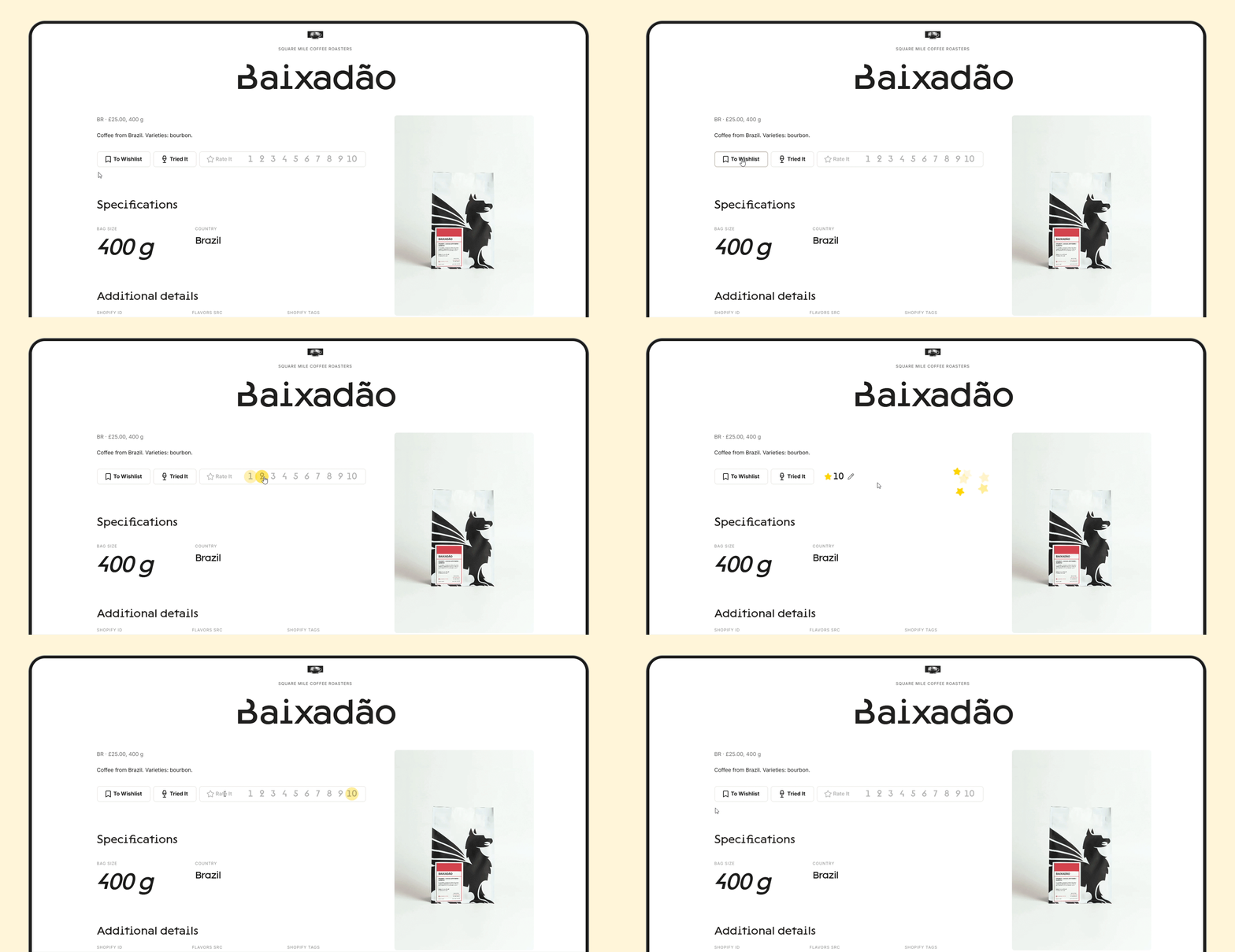
AI is also useful for finding corner cases — rare scenarios the team might overlook:
- what happens if there's no data;
- what the user sees when an error occurs;
- how the system behaves in an unusual scenario.
AI can flag these at the prototype stage. Not perfectly, but often well enough to catch things that are easy to miss.
Why everything starts breaking without a team
The paradox of AI is that without strong specialists, it often slows work down instead of speeding it up. You get more errors, iterations, chaos and technical debt, while losing control over quality.
From the outside, the product may seem to be moving faster. Later, however, the team can spend months fixing the consequences.
That's why the advantage doesn't come from replacing people with AI. It comes from learning how to integrate it into the process properly.
How we see AI
For us, AI is an "amplifier" for each team member. It helps specialists think and test ideas faster, analyse more deeply, spend less time on routine work and focus on better decisions.
That's why the team's experience remains the key value.
AI can suggest hundreds of options. But people understand:
- which one will actually work;
- which one can support the product as it grows;
- which one will work for users;
- which one won't create problems six months from now.
AI will become a much more powerful tool. But good products will still depend on teams that know what to build, why to build it and how to make the right decisions.
AI was involved in preparing this article too. We used it to transcribe a call, structure the material, check the text and prepare the cover and illustrations. But the logic, examples, narrative and edits were done by a human.
AI doesn't build products on its own. But it does an excellent job of amplifying people who know how.
Read more

AI in development: how to move faster without turning your product into a stack of hacks
- development
- AI

AI can already write code and design interfaces. So what’s left for humans?
- AI
- product design
Our projects


Digital product development
for scalable web and mobile products. UI/UX design, development, and end-to-end delivery
Let’s talk
By clicking the button I agree to the Privacy Policy
Message sent
We'll get back to you soon