
How we halved supplier delays at a marketplace warehouse
- product design
- research
7 minJune 3, 2026


Andrei Davydov
founder
Contents
- We started with a field study
- We continued by solving the problems
- Drivers struggle to find their way at the warehouse
- Drivers don’t know how to use check-in terminals
- Drivers don’t check invoices and select all documents they see on the screen
- Drivers forget to place a sticker on each delivery item and put documents in a special box
- Supplier managers aren’t interested in improving drivers’ efficiency
- We assessed the results and made conclusions
Since 2018 our team has been working with Emex, a marketplace for car parts and goods. So far the Depot 42 team has designed the marketplace interface, a supplier portal, some warehouse management services, and lots of other useful things. To get a good result, we carefully study business processes and the way a company works. Today we’re going to tell you how we used this strategy to quickly and efficiently solve Emex’s operational problems.
Over 50,000 orders are placed on Emex’s website every day. The same number of goods is delivered to its distribution centers daily.
Read also
Product design for Emex warehouse
For marketplaces it’s really important that everyone works fast and customers get their purchases on time. To make it happen, warehouse workers need to quickly find their way at the warehouse, package goods well and deliver to pick-up points. Besides, suppliers should deliver these goods at the right time.
Supplier drivers used to delay unloading goods and make mistakes when checking in goods and registering documents. They’d even leave the warehouse without checking in goods at all. It was our job to resolve this problem.
We started with a field study
We went to the distribution centre to watch supplier drivers checking in goods at the warehouse. We talked to experienced and newbie drivers and watched them work. We even checked in a couple of items ourselves. The drivers seemed quite reserved at first but turned out to be really sociable later on. They told us all about their problems and even let us check in their goods for them. In short, they were happy to help. The results of the field study showed at which steps in the process mistakes were made.

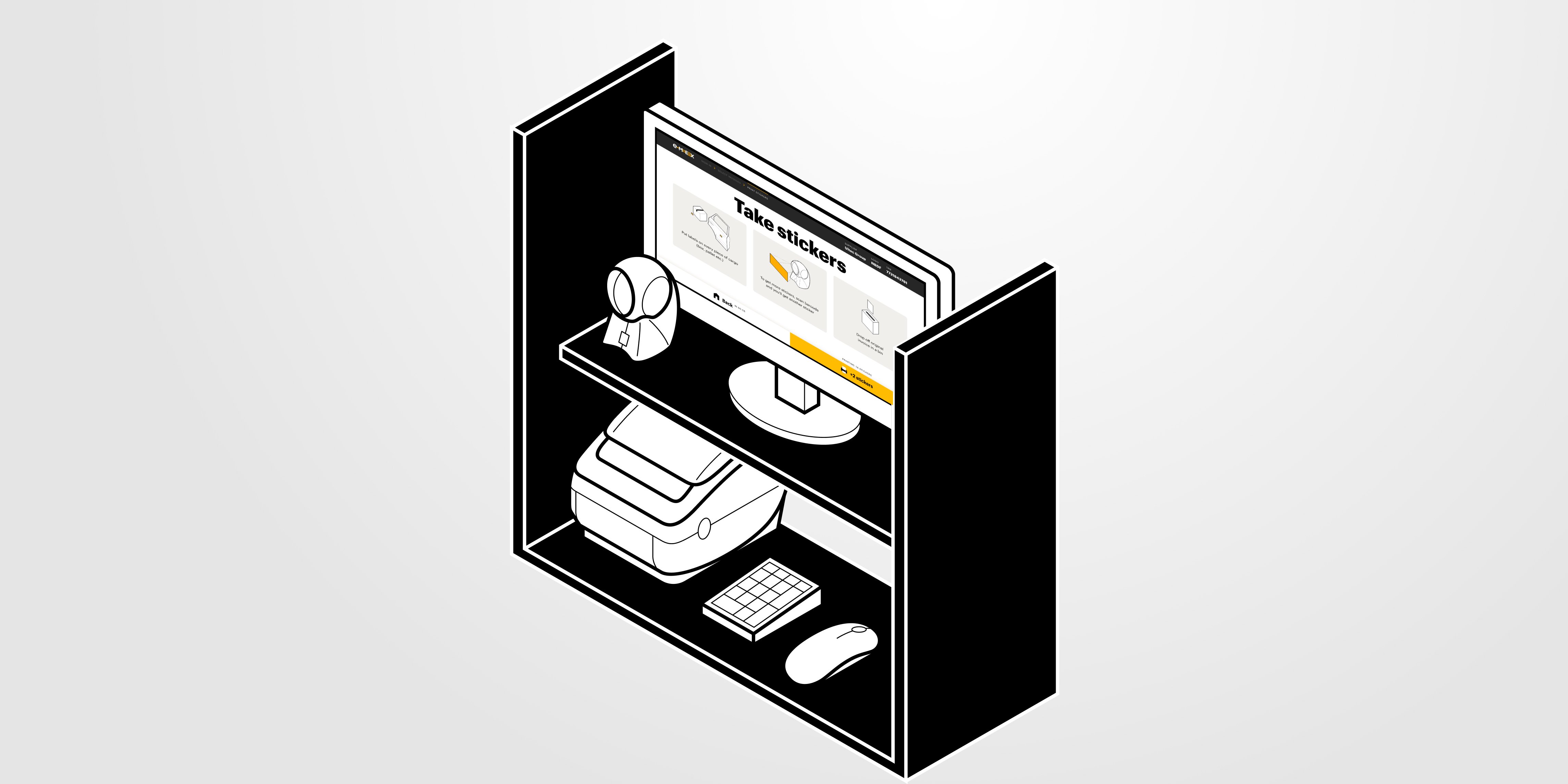
This is what a warehouse check-in terminal looks like. There’s a computer, a computer mouse, a num keyboard, a barcode scanner, a printer for printing stickers, and a box for putting in documents.
We wrote step-by-step instructions on what drivers need to do. The company used them to make check-in as automatic as possible:
- First a driver pulls up beside a ramp with terminals used for checking in goods. They look like self-checkouts at supermarkets and help warehouse workers save a lot of time.
- Then the driver lets the terminal know which supplier they’ve come from. To do this, they either enter a taxpayer identification number (TIN) or scan a barcode.
- After that the driver needs to select the correct invoices that match the goods they’ve shipped.
- When the invoices are selected, the terminal prints stickers. The driver has to put them on every box or oversized item. These stickers say when the goods were delivered and which supplier they come from.
- Finally, the driver has to put the paper documents in a special box.
We continued by solving the problems
Drivers struggle to find their way at the warehouse
When we were at the warehouse, we noticed that drivers couldn’t really see the check-in terminals after they got out of the cars. Plus, there weren’t any signs to direct them. New drivers wasted a lot of time looking for a check-in terminal or a warehouse worker who could explain what they had to do. That’s why we made three posters showing where the check-in terminals are and put them right on the ramp.

Some drivers have no idea how to check in goods. If they’re confused and don’t know what to do, they often go to the smoking area to get help. That’s exactly where we put a poster with instructions on how to check in goods.

Drivers tend to be warm-hearted and willing to help their colleagues. However, if there’s no one in the smoking area, the instructions will be very helpful.
We also placed instructions on how to check in goods on supplier stickers that have a special barcode. Drivers get them from managers before they set off for the warehouse.

Drivers don’t know how to use check-in terminals
On the initial screen of the terminal, drivers can either scan the barcode they have on the supplier sticker or enter the taxpayer identification number (TIN) to access invoices.
There used to be a lot of redundant elements on the screen, such as wide frames, repetitive prompts and a useless button.

We simplified the design and highlighted the essential elements. Following Fitts’s law, we placed the key buttons closer to the edges of the screen to make it easier to click them. We also increased the size and contrast of the interactive elements and text. There were two reasons for that. First, when the sun shines on the check-in terminals, the screen becomes difficult to read. Second, check-in terminals are used standing up, which makes the distance between the user and the screen much larger than with regular computers.

On the second screen, we improved the table where drivers select invoices. It used to have some useless columns that we removed. We kept columns that had essential information, i.e. invoice number, date and cost of goods. That should be enough to find the correct invoice.
We also made the interactive elements bigger and placed them on the edges of the screen. Documents can be selected by clicking on the whole row, not just the checkbox. It speeds up drivers’ work as they don’t have to click on the tiny checkbox over and over trying to select it.

Drivers don’t check invoices and select all documents they see on the screen
We noticed that drivers selected too many documents in the table, which led to confusion. Future supplies would get mixed up with previous deliveries and would be assigned the wrong time, goods would get misplaced, and formal percent of delays would increase. To address these issues, we added a reminder instructing drivers to select relevant invoices only.
We also observed that drivers clicked the “Select all” button without thinking, so we removed the button to prevent drivers from accidentally selecting irrelevant invoices.

Drivers were tempted to select all documents by clicking one button, which is why we removed it.
Drivers forget to place a sticker on each delivery item and put documents in a special box
On the last screen, I’ve added reminders saying that drivers need to place stickers on all delivery items and put paper documents in a special box. If there aren’t enough stickers, they can scan a barcode and print more.
Generally, pictures make an interface more clear. That’s why I’ve designed some pictures illustrating what reminders say. They can be very helpful for drivers using check-in terminals as they aren’t native speakers of English. For them, pictures are a practical necessity, not just a nice touch.
To make things easier for drivers who use the terminal next, the interface goes back to the initial screen after a minute.

We placed posters near the check-in terminals reminding drivers to use the relevant invoices and put stickers on each delivery item.

Supplier managers aren’t interested in improving drivers’ efficiency
It’s perfectly clear why supplier managers aren’t interested in helping drivers improve their efficiency. They find it more important to sell goods and get them delivered safely to a warehouse.
To boost managers’ motivation, Emex has changed its supplier rating formula. Timely delivery is now given more weight when calculating a supplier rating. We added visual content to the formula to make it easier to understand. Emex used these visuals to explain the formula changes to its suppliers.

We assessed the results and made conclusions
It was a speedy project that had impressive results. It took us only four weeks to complete it. We helped the company reduce delays by 56%, which is more than half. We noticed that drivers are much better at finding their way at the warehouse now and check in goods more quickly.
Despite the tight deadline and modest budget, we managed to resolve Emex’s problem. We confirmed once again that doing fieldwork and working with your hands is amazing. Our research experience not only helped us identify the issues in the system but also saved us the time we normally spend on testing hypotheses.
We were able to achieve excellent results because we got a more global picture of the product and the company. We weren’t afraid to go beyond what we usually do — change the interface as well as work environment and work communication.
Our projects

EMEX DWC Seller Portal
We designed interfaces for the international auto parts marketplace
Digital product development
for scalable web and mobile products. UI/UX design, development, and end-to-end delivery
Let’s talk
By clicking the button I agree to the Privacy Policy
Message sent
We'll get back to you soon